As a contractor, you have heard the term RSMeans, commonly used in the construction sector. Do you know what this is and why it is used? This guide is targeting RSMeans, covering each and everything on it. Let’s start!
What is RSMeans?
RSMeans Data (by Gordian) is North America’s leading construction cost database. In simple words, it is an encyclopedia of building costs that covers materials, labor, equipment and more, all organized logically. And it’s been powering construction estimation for over 70 years.
Understanding More About RSMeans
RSMeans started as a print cost book decades ago, but today it’s far more than notes on paper. At its core, RSMeans is a gigantic cost library for construction. It includes tens of thousands of line items with current prices. Line item doesn’t mean 100s or 200s, it is about over 92,000 units, where you can find current material, labor and equipment cost breakdowns. Whether you deal in concrete, HVAC, lumber, steel, or other materials, these line items give you a cover from everywhere.
The good news is you can find local data on that platform. RSMeans has data for 970+ cities and regions across North America. This means you can adjust costs to your exact market. Regarding its updates, it’s continuously researched and updated each quarter. As Gordian stated, its team spends tens of thousands of hours every year validating data available on the platform. Their goal is simple: you get current local data for precise and accurate estimates, ensuring your win.
Key Features of RSMeans
RSMeans packs a lot under the hood. Here are the core features that set it apart from other estimating databases.
● Comprehensive Database
As the software has 92,000+ line items, this covers virtually every building component. That means if you’re building a wall, it has the studs, insulation, drywall, paint and so on, all listed. And the same for other trades. All the items are stored in an organized way.
● Localized Cost Data
As a contractor, you know that materials, labor and equipment prices vary wildly by location, and you need the most accurate ones for the project at a specific point. RSMeans provides the data you require by including cost factors for nearly 1,000 areas across the U.S. and Canada.
This means you only need to pick your project’s city or region, and RSMeans will automatically adjust base prices. As RSMeans brings quarterly updates, your data on the software remains updated all the time, whether you’re in California or Toronto.
● Detailed Unit Price Breakdowns
On the screen, every unit cost comes with a line-item breakdown. This means the software tells you exactly how much of that price is materials, labor, equipment and productivity. Going in depth, the RSMeans Data Online platform gives you data, like “material $X, labor $Y, and equipment $Z, for each unit. Hence, you can easily know which cost driver is affecting your project cost the most.
● Square-Foot Models
Beyond individual items, RSMeans can do quick conceptual estimating by building area. The software lets you create entire building estimates based on square footage. For example, you plug in a building type and area, and the software will give you a budget in a few minutes.
Do you know where this feature helps? During large complex projects and the feasibility analysis of any size of construction. This means you can make informed decisions by using data available on RSMeans.
Pro Tip: If you need project predictive pricing 3 years into the future, rely on the Complete Plus tier of the software.
● CSI MasterFormat Organization
The standard CSI MasterFormat system organizes the data on the platform. In simple words, RSMeans groups materials, labor, and equipment costs by divisions and sections like “03 – Concrete” or “09 – Finishes.”
Thus, you can search by MasterFormat number or keyword to find related items in the database. This familiar structure means you can zoom into any trade and see all its cost entries without searching randomly.
● Electronic Access (CostWorks & Data Online)
You’re not stuck with paper books anymore. RSMeans Data Online, the web platform, gives 24/7 access on desktop or mobile. All updates come automatically; this means you always have current data about the particular project estimates.
For offline work, Gordian still offers RSMeans CostWorks CDs and e-books. The CDs are basically digital versions of the books that let you filter lists and export to spreadsheets. In short, you can use RSMeans data in whatever format fits your workflow: cloud, PDF, or CD.
Commonly Used RSMeans Formats
RSMeans data comes in different formats depending on how you need to work. They differ by delivery method, data structure, and classification:
1. Delivery Format
● RSMeans Data Online
This is Gordian’s cloud-based software. It’s a subscription where you log in and search the entire database in a browser. You can build, save and share estimates on the fly. It’s updated in real time, offers historical analysis, and even has new AI tools like Flash AI Estimating. Coming to its use, it’s ideal for teams that need anytime, anywhere access.
● RSMeans Data Books
These are the classic green-and-white books or their PDF e-book versions. Each year, there’s a book or bundle for each region and division. These are great desk references if you like flipping pages. They’re updated annually, so they get the prices at publication, but they won’t reflect market fluctuations mid-year. Still, many estimators keep them on hand for on-the-spot lookups.
● RSMeans CostWorks CDs
If you don’t want to carry books but still want offline data, CostWorks CDs are an option. They contain the yearly cost data in a desktop program. You can browse cost items, filter, and export directly to Excel. Simply put, they give digital data, but are static like books.
● eTakeoff Dimension Integration
For digital takeoff workflows, RSMeans hooks into eTakeoff. With this, you can measure quantities in eTakeoff Dimension and automatically apply RSMeans pricing to those numbers. This means your takeoff and pricing exist in one connected flow. You can get precise measurements from your plans and instant localized costing, which means fewer copy-paste errors and faster estimates.
2. Data Structure Format
● Unit Price Format
It is all about the basic RSMeans line items. Each cost is listed per unit (square foot, linear foot, each, etc.) with its material, labor, or equipment breakdown. This is the essential format for detailed estimates.
● Assemblies Format
These are pre-assembled groups of items. For example, a wall assembly might bundle studs, insulation, drywall and finish into one cost per linear foot or panel. Using assemblies speeds up estimating for repetitive systems, since you don’t have to pick each piece.
● Square Foot Format
It is a high-level model that gives a cost per square foot of building area. This is used for conceptual or schematic estimates where a detailed takeoff isn’t available. You’d choose a building type, like “office with brick exterior”, and let RSMeans compute a whole-building cost from square-foot averages.
3. Classification Format
● CSI MasterFormat® 2018
It is the current standard system, with 50 divisions, for organizing construction specifications and costs. RSMeans Data Online supports searching and grouping by these up-to-date divisions, including concrete, wood framing, electrical, etc. Most users stick with this since it matches current contracts and specifics.
● CSI MasterFormat® 1995
It is an older classification with 16 divisions, and is still seen on legacy projects or older documents. RSMeans keeps this format for those who need it, so that you can estimate the construction projects written to the old division system without confusion.
● UniFormat II (ASTM 1557-15)
This is a classification by building systems, meaning foundation, superstructure, envelope, etc. This means there is no involvement of trades here. RSMeans Data Online lets you set your estimates up by Uniformat II if you prefer a systems-based breakdown. As per Gordian, the new Work Breakdown Structure in their platform can align with Uniformat II standards.
You have done with the features of RSMeans, it’s time to move towards its role in construction.
Don’t let complex estimating tasks slow down your construction workflow. Let the experts at Cost Bidding handle the technical details, takeoffs, and pricing for you. We utilize the latest RSMeans data formats—from unit prices to assemblies—to deliver precise, format-compliant estimates tailored to your project
What is the RSMeans Role in Construction?
RSMeans is not just a data source; it’s built to solve common estimating issues. Explore its role in making a construction project successful.
● Accurate Cost Forecasting
When you need to estimate a construction project’s costs or market trends, RSMeans stands in the first position. Its database is continuously updated with current prices, and the new predictive cost data uses analytics to forecast up to 3 years out. Gordian even back-tested 10 years of data and found that their AI predictions stay within about 3% error. That means you can budget future costs or get early inflation figures with more confidence.
● Localized Pricing
As a contractor, you must have noticed a difference between local labor wages and base rates. You can avoid this issue with RSMeans since it has cost indices for ~970 markets and applies multipliers for zip-code-level accuracy. So, if you are working on out-of-state construction, simply enter the project location and let the RSMeans calculate the cost. This will give accurate estimates by considering local data on materials, labor, building codes, and construction standards.
● Budget Control & Risk Management
On RSMeans, you can get defensible, research-backed data. Each price is transparent with breakdowns of materials, labor, and equipment, and you can audit your estimate line-by-line. This means fewer surprises and less need for huge contingencies. You can even connect takeoffs with RSMeans, taking an extra step towards the highest possible accuracy in numbers.
● Time and Efficiency Savings
You know how building an estimate from scratch is slow. With RSMeans, you can speed it up. Quick search, drag-and-drop of items, automated calculations, and tools like Flash AI enable you to spend less time on estimation and more on strategy making. This automatically improves the time efficiency of the project.
● Standardization
RSMeans brings a common language and process. When everyone on the team uses the same data source, all bids and budgets line up uniformly. Gordian explains that their cloud workflow is built to be repeatable and scalable, helping teams standardize estimating practices.
This means that using RSMeans means your takeoff and costing follow a consistent format (MasterFormat or WBS) every time. This makes training easier, reviews faster, and hand-offs smoother, since the numbers always come from a reliable database.
After the role of the software, you must know when to use RSMeans.
When You Must Use RSMeans?
Professional contractors benefit from RSMeans at different construction project stages. Here are the major phases:
1. During the Bidding and Estimating Phase
When you’re putting a bid together, RSMeans is often front and center. It helps you:
● Creating Accurate Bids
RSMeans provides the raw cost data so your bid adds up right. You can take your takeoff quantities and match them to RSMeans line items, which include local pricing. This means each bid line has a justified cost breakdown for materials, labor, and equipment. You can catch missing items early and explain your math easily. With these solid inputs, your bid margins have increased.
● Estimating in Unfamiliar Locations
Suppose you’re bidding on a project in a city you’ve never worked in. RSMeans removes the guess factor here. You can pick the new location in the software, and all prices will adjust to that market automatically. This avoids mistakes related to wage differences or shipping surcharges.
● Conceptual Estimates
Early on, the plans might be half-done, but you still need a conceptual estimate. RSMeans square-foot models provide you with that. You just need to provide building type, scope keywords, and square footage, and RSMeans will deliver a budget within a few minutes.
Note: It is not a final bid, but it’s a credible range you can rely on for feasibility analysis of the project.
The plus point is results are available within a few minutes; this means you can respond to your clients within almost no time when one asks for a rough estimate.
2. During Project Planning and Management
RSMeans helps even after you win the contract. See how!
● Validating Subcontractor Bids
When subcontractors hand in their quotes, you have RSMeans as a benchmark. If a plumbing subcontractor’s quote looks unusually high, you can compare it against RSMeans’ supply and install rates. And using that data, you can say, “This pipe installation shouldn’t cost $X as RSMeans gives more like $Y.” This makes negotiation more powerful and enables you to avoid overpaying for anything.
● Predicting Future Costs
For projects that span months or years, their costs change in the future. With RSMeans, you can see the future cost. Using the predictive data tools, you can see likely price trends for materials and labor. This means you can lock in fixed-price buyouts or schedule tasks when prices are favorable. Gordian’s predictive model is proven to keep forecasts within 3% of what actually happens, so you reduce the risk of budget overruns.
● Scheduling and Productivity
While the software is cost-focused, it also ties to the schedule indirectly. Knowing the RSMeans labor hours for a task can support your team’s planning. Moreover, because the database estimates are faster to update, you can more quickly re-price schedule shifts or change orders. If the schedule changes and you need to accelerate work, you have RSMeans to recalculate the labor premiums quickly. Overall, using RSMeans keeps your project management data consistent with your budgeting.
After knowing the right time to use, you must have the skills to operate the software correctly.
What Skills Are Required to Collect Data from RSMeans
To get the most out of RSMeans, you need a blend of construction smarts and tech skills:
● Technical Skills Required
➔ Quantity Takeoffs
You must accurately measure plans or drawings to feed into RSMeans. If your takeoff (square feet, linear feet, counts) is wrong, the best database won’t save you. Simply put, reliable drafting and takeoff techniques are fundamental.
➔ Construction Knowledge
You need to know your construction. RSMeans lists items like “6×6 POST – pressure-treated”. You have to recognize when that item applies. Understanding building systems, like how a wall goes together and how electrical systems are laid out, is crucial. This also includes knowing local construction practices so you match RSMeans items properly.
➔ Data Navigation
RSMeans Data Online is large. You should be comfortable searching keywords, filtering divisions and zeroing in on the right item. Familiarity with CSI division names and terms helps you browse quickly. Simply put, navigation skills mean you spend minutes finding an item instead of hunting for half an hour.
➔ Adjusting for Location and Time
Even with RSMeans doing the math, you still need to decide the right region and time adjustments. You should know when to modify the cost for a given city or how to apply an index for a future start date. This requires judgment about market conditions.
➔ Cost Analysis
Beyond pulling numbers, you have to analyze them, answering the following questions:
- Are your totals in line with similar projects?
- Do some items look off?
This means you should be able to break the estimate down by trade or category and double-check it. Professional estimators use RSMeans outputs to perform ratio checks, e.g., labor vs material percentages, and ensure the overall cost seems reasonable.
● Software and Digital Skills Required
➔ RSMeans Data Online Navigation
The web interface has tools and features. You should learn to set up projects, use the square-foot estimator, save assemblies, etc. If using Flash AI, you need to know how to upload documents and interpret the AI’s chat responses.
➔ Spreadsheet Proficiency
Often, you’ll export line items or summary costs from RSMeans to Excel for formatting or deeper analysis. Skills like sorting, formulas, and pivot tables let you manipulate software data after export.
➔ Digital Takeoff Integration
If you use takeoff software like eTakeoff Dimension, you should know how to perform digital takeoffs and align them. For example, adding a line in eTakeoff should link to a cost item in RSMeans. The setup requires understanding both platforms. So, knowing how to import software catalogs into your takeoff tool or vice versa is essential.
For all these skills, you can get training or certifications from authoritative institutes in your area.
Certifications & Training You Can Get for RSMeans Skills
- Gordian RSMeans Online Training
- RSMeans Virtual/In-Person Seminars
- AACE International CEP/CCP or CET
- ASPE Certified Professional Estimator (CPE)
- Microsoft Excel Specialist/Advanced Excel
- eTakeoff or Similar Digital Takeoff Course
Note: Many contractors prefer to hire a consultant or estimator for project budgeting rather than investing time in certifications and training.
How to Implement RSMeans in Your Workflow
Here’s a practical approach:
1. Set Up Your Estimate
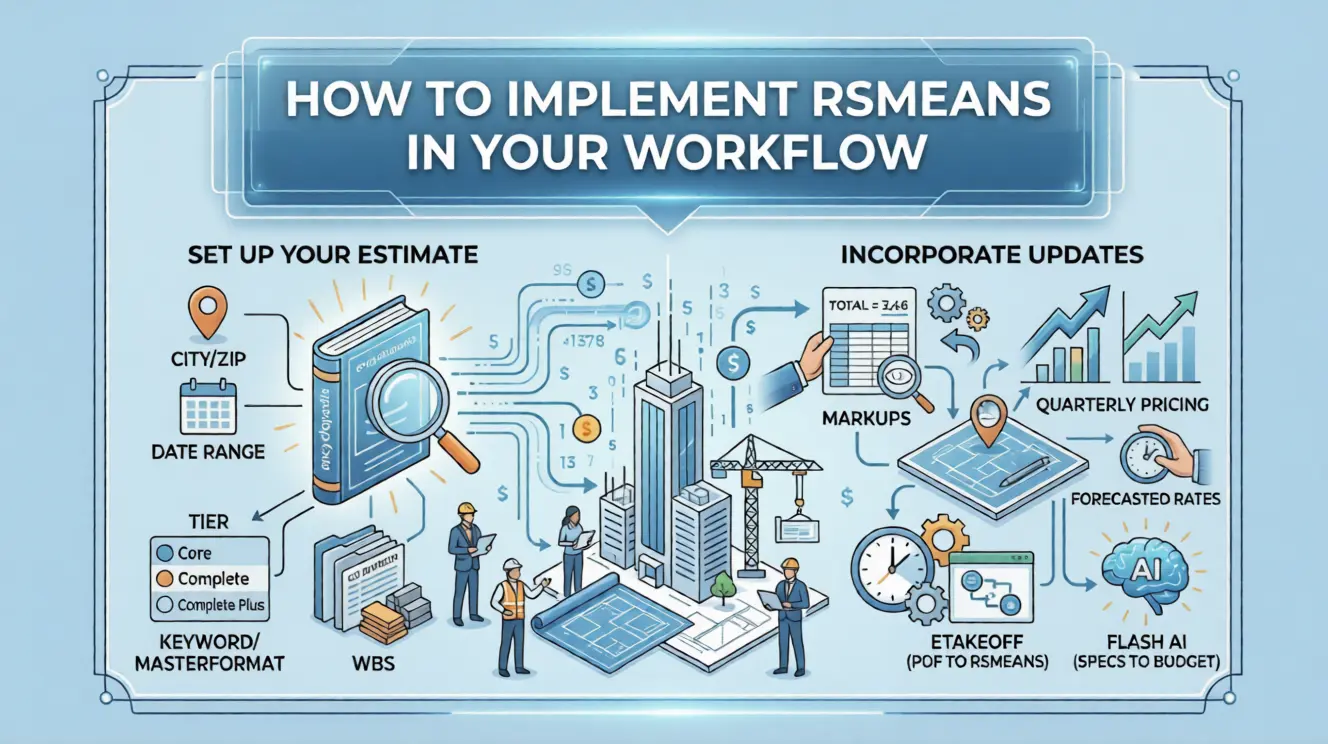
Begin by creating a new project in RSMeans Data Online. Enter the location of the job (city/zip) and the date range or year. This ensures all costs and indices align correctly. Choose your data tier (Core, Complete, or Complete Plus) based on the details you need.
2. Organize Your Takeoffs
Group your quantities by a logical breakdown, either by CSI division or a custom Work Breakdown Structure. For example, group all site work items together, all framing items together, etc. This will make cross-checking easier.
3. Match to RSMeans Items
For each takeoff quantity, search in the software for the right unit item. Use the keyword or MasterFormat search, and confirm the unit matches. Add it to your estimate list and set the exact quantity. Repeat for all line items.
4. Review and Adjust
Once all items are in, the software will calculate costs. Scan for any surprises. If something looks off, you can modify the item choice or adjust the cost driver. Also apply any markups, waste factors or overhead outside RSMeans as separate line items.
5. Incorporate Updates
If using the online subscription, you’ll get quarterly pricing updates. Make sure you apply those if your project spans a year, so you’re always using the newest data. If using predictive cost, check the forecasted rates for future periods.
6. Leverage Integrations
To save time, consider using eTakeoff or Flash AI. With eTakeoff, you can pull quantities directly from PDF plans into RSMeans costs, eliminating copy-paste. And with Flash AI, you can upload specifications or ask it for high-level estimates to begin your budget. These tools can dramatically speed up the process.
7. Collaborate and Document
Use the software’s notes and summaries to explain assumptions, like “Why did you choose one assembly over another?” Share the online estimate with your team or client. All the data you generated, including exported tables, should match the RSMeans outputs to keep everything transparent.
In 2026, implementing and using RSMeans has become easier with advancements.
What are the 2026 Advancements in RSMeans?
Looking ahead, the software is adding new tech and features for 2026. Here are the highlights:
● Predictive Construction Cost Data
By now, most people have heard of AI forecasting for construction costs. Gordian’s Predictive Cost Data is RSMeans’ answer. Using machine learning on 60+ quarters of historical cost data, it predicts material and labor prices up to 3 years out. They tested the last 10 years and found predictions to stay within about 3% error. That’s a game-changer for long timelines: you can budget future phases with far less guesswork.
The key thing is data-driven forecasting. You’re not just assuming flat inflation, but you’re using statistics. In 2026, you must be seeing integrated Cost Insights dashboards that show these predictive trends; for example, guard rails or steel prices over the next 36 months, right alongside your estimate.
● AI-Powered Takeoff & Estimation
Flash AI Estimating is live and learning fast. It uses AI to automate measurements and speed up estimating. Now, you can upload your plans or specifications and chat with an assistant: “Estimate the Cost to Seal a Concrete Driveway in 2026.” The AI will identify the key items and quantities and build a preliminary estimate for you.
Contractors who’ve tried it report getting roughly 80% of an estimate right out of the gate. In other words, the tool spits out a budget that’s already mostly complete, so you only modify the last 20%. This is about significant time saving with powerful automation that also ensures more than half of the required accuracy.
● Gordian Cloud Platform Integration
Gordian has rolled out its new Cloud Platform to unify everything, including RSMeans Data Online, in one interface. The promise is a streamlined user experience and faster search across products. For you, this means the software is connected to eTakeoff, Job Order Contracting (JOC) catalogs, assessment tools, etc.
Now, you can say goodbye to confusing logins or exporting CSVs, as data can flow between modules. Gordian highlights that it seamlessly unifies offerings in one place to speed decision-making. They also highlighted enhanced collaboration, which means multiple stakeholders, including estimators, owners, and subcontractors, can log in to see the same data and notes in real-time.
Furthermore, the UI of the software is also being modernized, with better search tools and dashboards. In short, the 2026 Gordian Cloud Platform makes RSMeans a fully connected estimating hub, not just a standalone calculator.
● Customization
On the customization side, Gordian is adding specialized datasets, for example, unit costs that include sustainability and lifecycle impacts. While details are proprietary, you can flag line items for low-VOC paint and see the carbon footprint of a wall assembly on the same screen.
● Enhanced Data Insights
Above all, Gordian is beefing up the analytics. The Data Insights, Cost Trends Dashboard is now fully powered by RSMeans Data. Now, you can get dynamic charts showing 10 years of historical cost trends and projected increases 3 years forward. This goes beyond raw unit costs. The dashboard uses advanced visualization so you can spot patterns, like red-hot lumber or cooling concrete markets, at a glance.
In the implementation section, we mentioned tiers. Understand them below!
3 Tiers of RSMeans
RSMeans tiers represent different subscription levels for construction cost estimation, offering increasing levels of detail, functionality, and data access. See the details below!
1. Core Tier
The Core tier gives you basic unit and task cost data, organized by MasterFormat. It’s online so you can quickly get a line-item price and share simple estimates.
2. Complete Tier
Complete tier builds on Core with more tools at your disposal, all online. It adds assembly and square-foot pricing plus a square-foot estimator, editable assemblies, WBS, and custom reports.
3. Complete Plus Tier
The Complete Plus tier has everything in the Complete plus extra features. These include renovation models, life-cycle costing, and a full historical cost library. It is what you can use to predict prices up to 3 years ahead so that you can budget for the future.
FAQs
What is RSMeans used for in construction?
Primarily for cost estimating and budgeting. It provides standardized cost data so contractors, architects, and owners can create and control project budgets. You can use it for bid estimates conceptual budgets, feasibility studies and cost tracking.
How accurate is RSMeans?
Very accurate when used properly. Gordian calls RSMeans the industry standard for cost accuracy. Its data is backed by thousands of research hours each year, and it’s continuously updated. On top of that, their new predictive model has been tested to be within about 3% of actual market costs.
How much does RSMeans software cost?
RSMeans Data Online is sold in tiers. As of 2026,
- The entry-level Core subscription is about $396/year, which gives basic unit pricing.
- The Complete tier for deeper data and historical trends is around $1,019/year.
- And the top-tier Complete Plus with predictive analytics is about $5,973/year.
Note: These prices can vary, and sometimes Gordian runs promotions. Plus, there are also costs for annual books or CDs if you use them, and each subscription usually covers one user.
Conclusion
RSMeans is the source that makes your estimate highly accurate and precise. It packs a comprehensive, localized cost database with modern tools that save time and reduce risk. By using this software, you can wind up bids faster, catch missing costs, and justify pricing to owners. In short, it makes bidding faster and more efficient.
If you’re a busy contractor focused on running jobs, remember: you don’t have to master RSMeans to get accurate estimates. Firms like Cost Bidding specialize in construction estimating. This means you can hand off your plans to expert estimators. They’ll use RSMeans, freeing you up to focus on your core work.